
Glaux vs Microsoft Agent 365 vs building it in-house
A fair look at three ways to govern AI agents at a mid-size company: what each is good at, where each falls short, and how to pick.

If you’re responsible for security at a company of a few hundred people, you’ve probably had this meeting. Someone says, “We need to get AI agents under control.” Three paths come up almost every time:
- “We’re a Microsoft shop. Doesn’t Microsoft have something for this?”
- “There are startups doing this now.”
- “Can’t we just build it? It’s a proxy and some logs.”
We build one of the startups, so take this with the right amount of salt. We’ve tried to be fair anyway, and to link our sources. The honest answer is that each path is right for some companies.
The short version
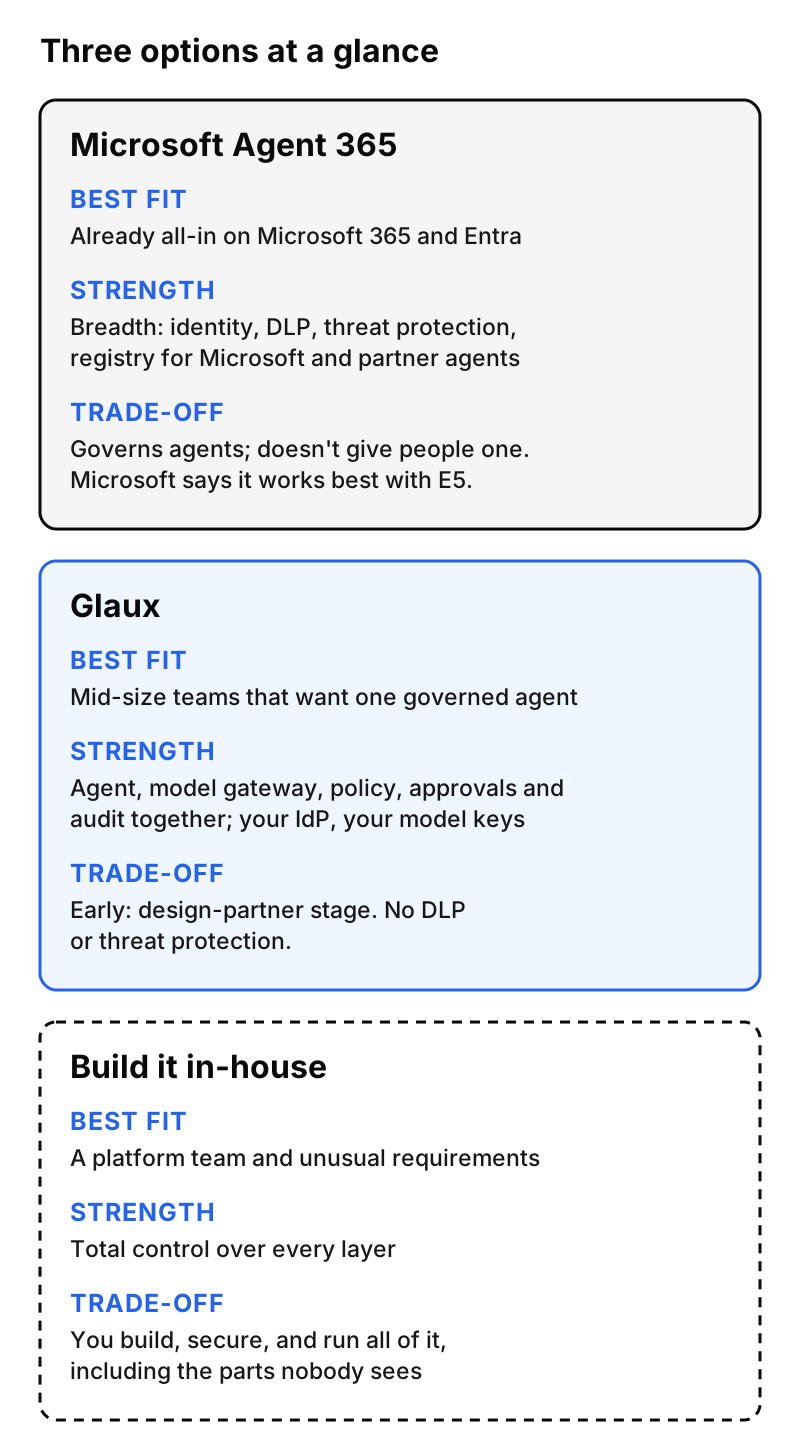
Option 1: Microsoft Agent 365
What it is
Microsoft describes Agent 365 as “the control plane for agents.” It became generally available for commercial customers on May 1, 2026 (Microsoft Security Blog). It’s built to observe, govern, and secure agents across Microsoft and partner platforms, including SaaS, cloud, and local agents (Microsoft 365 blog).
Its product page lists an agent registry, an agent map, lifecycle management, onboarding with policy templates, control over which tools and MCP servers agents can use, audit and logging, and conditional access, data security, and threat protection that draw on Entra, Purview, and Defender (product page).
It’s licensed per user. Microsoft lists it at $15 per user per month standalone, and it’s included in Microsoft 365 E7 (licensing FAQ). Microsoft’s own docs say it “works best when using Microsoft E5 as a pre-requisite” (Microsoft Learn).
Where it shines
- You already run on Microsoft. If Entra is your identity provider, Purview runs your data labels, and Defender is your security stack, Agent 365 extends things you already operate. Agents can inherit sensitivity labels and data loss prevention rules. That’s a real advantage, and one a third party can’t easily copy.
- Breadth. It covers registry, lifecycle, data security, insider risk, and threat detection for agents. Glaux doesn’t try to do most of that.
- Many agents from many places. If your problem is sprawl, meaning dozens of agents built in different tools by different teams, an inventory and lifecycle layer is exactly what you need.
Where it may not fit
- It governs agents. It doesn’t hand people one. Your employees still need an agent to work with, whether Copilot, something built in Copilot Studio, or a partner’s. Agent 365 is the control layer around them.
- It assumes the Microsoft estate. Microsoft says it works best with E5. If you run Google Workspace or Okta, or you’re a lean shop without E5, you’ll get less from it.
- Breadth takes people. Getting value from a suite this wide takes admin time across several consoles. Large IT teams have that. A three-person security team may not.
Option 2: Glaux
What it is
Glaux is a governed AI coworker. It includes both the agent employees use and the governance around it, as one product.
- The Glaux desktop app is the agent people work in.
- Glaux Control Tower handles identity, policy, approvals, access requests, and an append-only audit store.
- The Glaux AI Gateway holds your own model provider keys, hands out 30-minute session keys, limits which models are available, and enforces an organization budget.
- The Glaux tools gateway governs MCP tool access and checks policy on every call.
- The Glaux skills library lets you review and promote shared skills, and the agent runs an exact, verified version of each one.
- Sign-in uses your existing identity provider through single sign-on (SSO), so you aren’t tied to one directory.
Where it shines
- One product, one policy. The agent and its guardrails come from the same place, so there’s no gap between “what the tool does” and “what the governance layer sees.”
- Bring your own identity provider and model keys. It isn’t tied to one identity provider or one model vendor.
- Built for teams without a platform group. Policies can be simulated, previewed for impact, published, paused, and rolled back from one console.
- Honest audit. Records capture decisions, not prompts, can’t be edited, and show when a source’s coverage is stale.
Where it may not fit
- It’s early. Glaux is in its design-partner stage. Microsoft has a GA product with a long enterprise track record. If you need a mature vendor with broad certifications today, weigh that seriously.
- It isn’t a data security suite. Glaux doesn’t do content-level DLP, insider-risk scoring, or threat detection. If you need those for agents, they come from elsewhere.
- It governs the Glaux agent, not your whole agent fleet. If your main problem is inventorying dozens of agents built on other platforms, Glaux isn’t a registry for those.
Option 3: Build it in-house
What it is
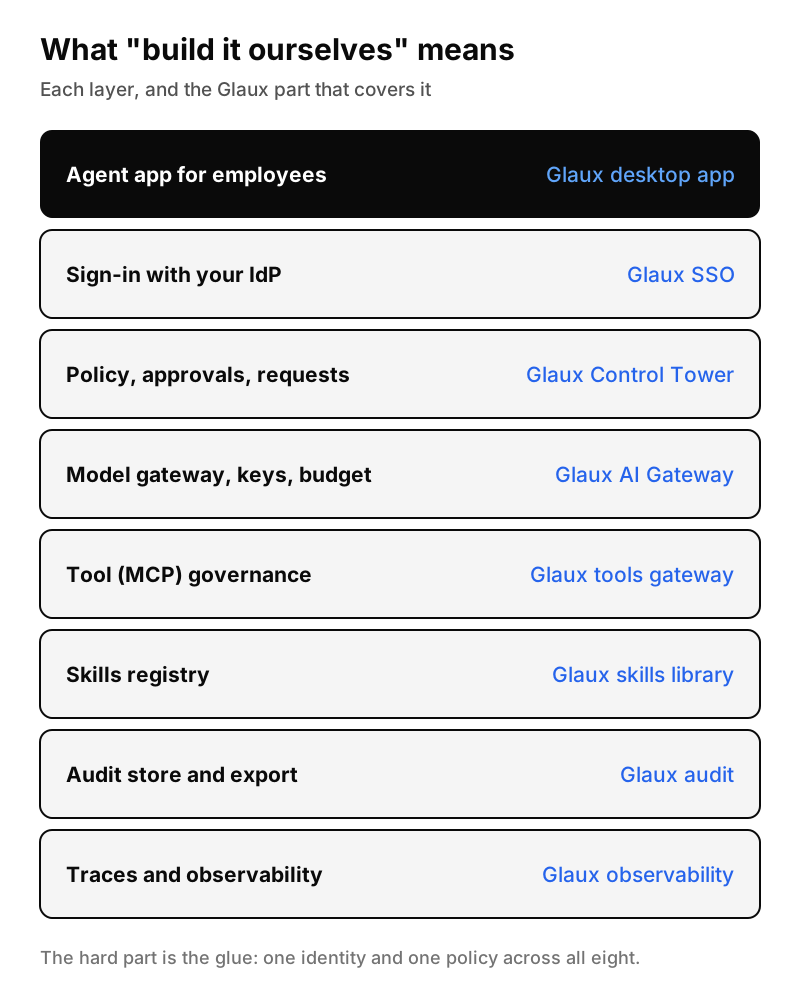
You assemble the pieces yourself. This is a legitimate choice, and many of the building blocks are open source. Here’s what the job looks like, layer by layer, next to the Glaux part that covers each one.
Where it shines
- Total control. Your rules, your data residency, your release schedule.
- Unusual requirements. If your workflows or regulators need something no product offers, building may be the only way.
- You have the team. If you already run a platform group that ships internal tools, this is familiar work.
Where it bites
“It’s a proxy and some logs” is how the project starts. Here’s what tends to come after:
- The glue is the product. Each layer is fine alone. The hard part is one identity and one policy across all of them, so that turning a permission off in one place stops it everywhere, right away.
- The unglamorous cases. Key expiry. Approvals that should lapse. Permissions that change mid-session. What happens when a dependency is down, which should mean failing closed and not failing open. Secrets that sneak into log fields. None of it shows up in a demo, and all of it shows up in an audit.
- It never ends. Model providers change APIs. Open-source components ship security fixes. Someone has to own upgrades, on-call, and evidence for the next audit, every quarter.
A useful exercise: list the eight layers above, put a name next to each, and ask who maintains it in two years.
How to choose
Here’s the rough rule we’d use, even when it doesn’t point to us.
Choose Microsoft Agent 365 if you’re standardized on Microsoft 365 and Entra, have or plan to have E5, and your main problem is governing many agents across Microsoft and partner platforms.
Choose Glaux if you’re a mid-size team in a regulated field, security is what’s holding back AI adoption, and you want one governed agent your employees can use now, with your own identity provider and model keys.
Build in-house if you have a platform team with time to spare, requirements no product meets, and the appetite to own the unglamorous parts for years.
You can also mix them. Using Microsoft’s suite for data security alongside a dedicated governed agent is a reasonable setup. So is using open-source pieces where you have the strength and buying the rest.
Whatever you pick, run the same test: choose one sensitive action, like sending a customer file outside the company, and ask each option to show you who allowed it, under which rule, with which approval, and where that’s recorded. The answers will tell you more than any feature list.
Glaux is in its design-partner stage. If you’re weighing these options, we’re happy to walk through the tradeoffs with you, including when we aren’t the right fit.