
A practical AI usage policy checklist
Most AI policies are a PDF nobody reads. Here's a 12-item checklist for a policy that actually runs, with notes on how each item maps to controls in Glaux.
Most companies we talk to have an AI policy. It’s usually a PDF. It says sensible things like “don’t put confidential data into AI tools,” and it was emailed to everyone once.
Then someone asks: is the new hire in finance allowed to connect the agent to the shared drive? Can she use the bigger model? Should sending a file outside the company need sign-off? The PDF doesn’t say. Or it says something vague, and everyone reads it differently.
A policy only works if it can be enforced, checked, and changed without a meeting. So here’s a checklist for a policy that runs. Each item has two parts: the decision you need to make, and how that decision maps to a control in Glaux. The decisions are worth making whatever tools you use.
The list comes in three groups: who can use AI, what the agent can do, and how you keep evidence.
Part 1: Who can use AI, and with what
1. Decide who gets access, and in which context
Write down which teams get AI, and in which workspaces. “Everyone, everywhere” is rarely the right first answer.
In Glaux: people sign in with your existing identity provider. Access comes from what an administrator assigns in Glaux, not from group names that arrive with the sign-in. Admin powers come as two templates, Administrator and Operator, each scoped to the whole organization or to one workspace. So you can let a team lead run their own workspace without handing them the keys to everything.
2. Pick the models you trust
Decide which providers and models are approved, and for what. Most teams start with one or two.
In Glaux: administrators turn providers and models on in the AI Gateway. Your provider keys are stored there, never on laptops. People get a 30-minute key tied to one session, and only approved models answer.
3. Set a spending boundary
Agents loop. A misconfigured one can burn a month’s budget over a weekend. Decide your ceiling before that happens.
In Glaux: the AI Gateway enforces an organization-level budget. When it’s used up, new model calls stop.
4. Write down what must never leave
Name the categories outright: customer PII, health data, source code, credentials, whatever applies to you. Vague phrases like “sensitive information” don’t hold up.
In Glaux: we can’t make that list for you, but we can keep the governance layer from becoming a leak itself. Audit records and telemetry keep prompts, responses, raw tool payloads, and secrets out. Values that look like credentials are rejected from audit fields. Keep in mind that Glaux doesn’t scan content for sensitive data the way a DLP product does. That part of your policy needs its own control.
Part 2: What the agent can do
5. Sort actions into four buckets, not two
Here’s where most policies fall apart. “Allowed” and “not allowed” isn’t enough. Real work needs a middle ground.
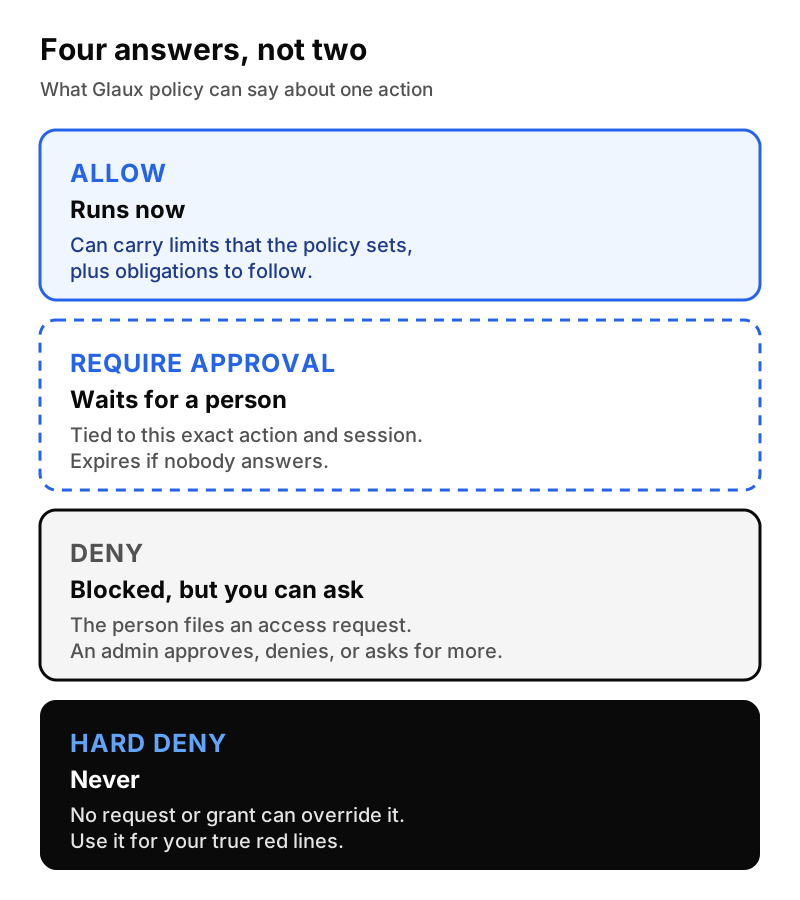
For each sensitive action, decide which bucket it belongs in:
- Allow. Reading internal docs, drafting, summarizing.
- Require approval. Sending anything outside the company, or changing a record in a system of record.
- Deny, but people can ask. A tool most people don’t need, but some will.
- Hard deny. Your true red lines.
In Glaux: policies are written in Cedar, an open policy language, and these four outcomes are built in. A hard deny can’t be overridden by any access request or grant.
6. Make approvals specific and short-lived
An approval like “yes, the agent may send emails” is really a permanent permission. Good approvals are narrow and expire.
In Glaux: an approval is bound to one session, one action, and one resource. It carries a risk level and an expiry, and it never outlives the session’s own permissions. Before the action runs, Glaux checks again that everything still matches and that the person is still a member of the workspace.
7. Give people a way to ask
If “no” is a dead end, people route around it. A good policy says how to ask, who decides, and how fast.
In Glaux: when something is denied (but not hard-denied), the person can file an access request. An administrator can approve, deny, or ask for more information, and the requester can cancel. High and critical requests are routed to administrators, and every request has an escalation clock set by its risk: one hour for critical, four hours for high, a day for medium, and two days for low.
8. Approve the tools before the agent can touch them
Connecting an agent to email, a drive, or a CRM is where most real risk lives. Decide which tools are approved, and who can use each one.
In Glaux: tool access over MCP is governed by the Glaux tools gateway. It keeps the registry of approved tools, holds their credentials, and checks policy on every call, not only at setup. Routing all desktop app tool use through it is in final integration.
9. Curate shared skills
Skills are reusable instructions and scripts that teach the agent how your team does something. They’re powerful, and they’re code. Treat them like code.
In Glaux: skills live in the Glaux skills library, with review and promotion steps. When the agent uses a skill, it runs one exact version, checked by its digest. A swapped or tampered package is refused.
Part 3: Changes and evidence
10. Test policy changes before they land
The most common governance outage is a policy change that locks out a whole team on Monday morning.
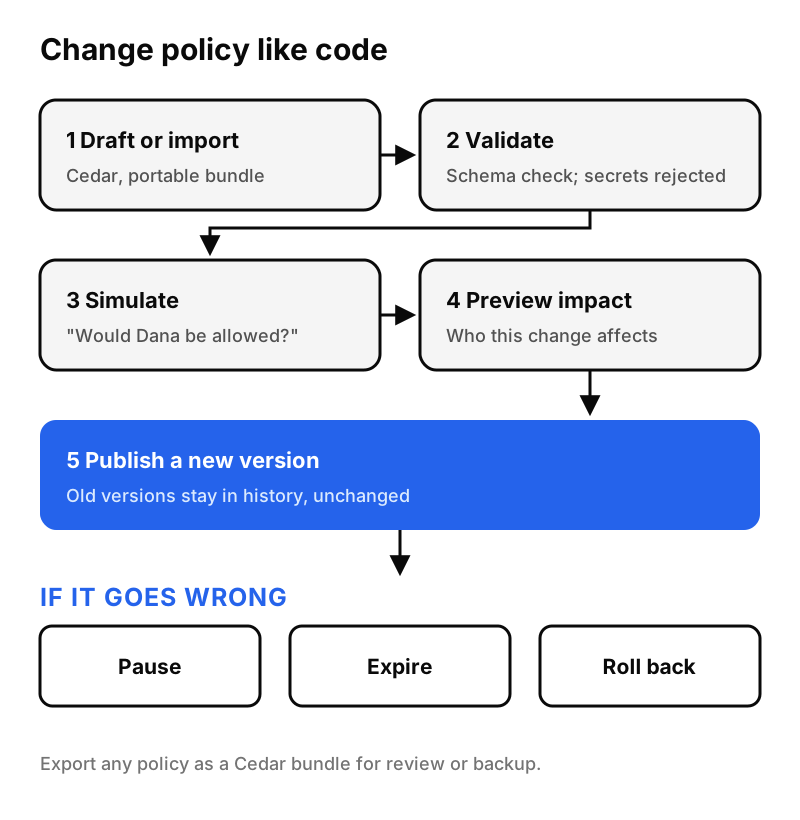
In Glaux: policies move through a lifecycle. You draft or import a policy, and Glaux validates it against the schema and rejects anything that looks like a secret. Then you simulate it (“would Dana be allowed to do this?”), preview which people it affects, and publish it as a new version. If it goes wrong, you can pause it, let it expire, or roll back. Old versions stay in history, unchanged, and any policy can be exported as a portable Cedar bundle for review.
11. Decide what evidence you’ll keep, and who can export it
Your auditors will ask. Decide now what gets recorded, how long it’s kept, and who can take a copy.
In Glaux: decisions go to an append-only audit store that the database itself won’t let anyone edit or delete. Each record captures who, where, what, the outcome, and the policy version. Exports to CSV or JSONL need their own permission, use short-lived download links, and can be revoked. We go deeper in What an audit trail for AI agents should capture.
12. Plan for the day someone leaves
Offboarding is where permissions linger. Decide how fast AI access should stop when someone leaves or changes teams.
In Glaux: model access depends on a valid sign-in, a current assignment, and a key that lasts only 30 minutes. Revoke the person’s access, and new model calls stop without hunting for keys on a laptop. Automatic sync with your directory, so that offboarding in your identity provider flows straight through to every connected service, is still in progress and not yet generally available.
Then: put a review on the calendar
None of this is set-and-forget. Put a quarterly review on the calendar. Look at what was denied, what needed approval, which access requests piled up, and which skills and tools went unused. The denials and requests tell you where the policy is too tight. The approvals tell you where it might be too loose.
The one-page version
If you take one thing from this, take the questions. A good AI usage policy answers each of these in a sentence:
- Who can use AI, and in which workspaces?
- Which models are approved?
- What’s the spending ceiling?
- What must never leave the company?
- Which actions are allowed, need approval, can be requested, or are never allowed?
- How narrow is an approval, and when does it expire?
- How do people ask for more, and how fast do they hear back?
- Which tools can the agent reach?
- Who reviews shared skills?
- How are policy changes tested and rolled back?
- What evidence is kept, and who can export it?
- How fast does access stop when someone leaves?
If your PDF can’t answer them, that’s fine. Most can’t. Start with the four buckets in item 5. It’s the change that turns a document into something you can enforce.
Glaux is in its design-partner stage. If you’re turning an AI policy from a document into working controls, we’d love to compare notes.